Showing posts with label Life Hacks. Show all posts

3 Essential Ways to Boost Your Productivity

People with Evil Plans keep busy. Probably too busy. But keeping busy doesn't equate to being effective or productive.

The key to your success is finding ways to maximize your productivity while minimizing unnecessary stress.

It's possible, and it's downright necessary if you're looking to make a dent in the universe.

So to be more productive, there are 3 essential things you must do.

1. Disconnect
Einstein once said that "We can't solve problems by using the same kind of thinking we used when we created them." It's so true. It's so easy to get sucked in and get caught up in our momentum. The days rush by as we're propelled forward, but in what direction? Are you on track or have you veered off the right path?

You have to disconnect frequently to reassess and plan a more sensible approach. Disconnect a couple of times a day for a few minutes and reassess your effectiveness. Are you just putting out fires or are you working on things that will yield results today AND in the future?

You can also disconnect frequently to take a high level look at your work. Do this on a weekly, monthly or yearly basis. Do it as much (or as little) as you need to feel comfortable that you're on the right track. And remember that rest and leisure are your friends. They'll help you renew and refocus your energy.

2. Singletask
Multitasking is the enemy. It only creates the illusion of speed and actually wears you down. You spin your wheels frantically and don't get very far. It brings unnecessary stress and saps your creative powers. So instead of diluting your energy, focus it! Work on one thing at a time. Focus. Ignore the phone. Turn off email. Don't instant message. Get it done, then move on to the next truly productive task.

3. Batch
Bundle similar tasks together and get them done in one shot. If you have multiple errands to run, batch them together and schedule a single block of time to check them all off your list. At work, don't check email sporadically throughout the day or as they come in. That kills productivity. Instead, block off specific times to deal with email and then shut it off. This'll free up blocks of uninterrupted time to work on your projects.

One last word. All this may sound simple, but it's not particularly easy to do. It takes discipline and determination. So ask yourself, how badly do you want it?

Life Hack: Check Out Evernote App for Your PC and Mobile Phone

Evernote, the digital notebook app for your PC or mobile device, is something of a small miracle.

I've been using to take notes in meetings; to capture ideas on a mobile device like an iPhone or iPod; to scan my paper notes and email them to the cloud for OCR-based indexing; to save important email or MS Office documents, or to search for and retrieve those very same documents in a flash!

This is cloud computing at its finest and it's all FREE!

Evernote consists of a web-based application that's accessible from any device connected to the web. You can also download an application for your Mac or PC and a version for your iPhone or BlackBerry smart phone. And the coolest thing is that keeping all these versions synchronized is nearly effortless. Just set the sync intervals and the application does the rest.

You can upgrade your account to the premium version for just $5, which is a pittance compared to the convenience and productivity gains you'll get from having access to your notes anywhere you go. The perks of going premium include more disk space and faster OCR services, just to name a few.

I highly recommend you check Evernote out. I think you'll enjoy it.

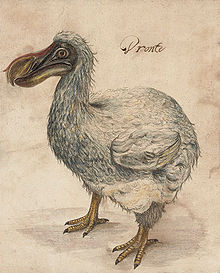
Will Printed Books Go the Way of the Dodo?

Jason Epstein has written a thought-provoking piece in the New York Review of books in which he contends that the digitization of the printed word is a revolution fraught with both opportunity and divers woes, and that ultimately it will NOT render physical books obsolete.

I agree.

One of Epstein's points is really fascinating. He argues that digital media is inherently fragile and can be deleted and lost accidentally or through more nefarious means:
Digital content is fragile. The secure retention, therefore, of physical books safe from electronic meddlers, predators, and the hazards of electronic storage is essential. Amazon's recent arbitrary deletion of Orwell's 1984 at its publisher's request from Kindle users who had downloaded it suggests the ease with which files can be deleted without warning or permission, an inescapable hazard of electronic distribution.
It's hard to see how hackers or cyber-terrorists could wipe-out the electronic stores of man's creative and collective knowledge, but it's a point definitely worth considering, especially given our over-reliance and fetish-like dependence on all things techno-logic. And it's worth noting that we all know the consequences of such wholesale destruction of knowledge as occurred after the burning of the ancient library of Alexandria.

But personally, I can't picture a world in which physical books are gone.

I think e-books are GREAT -- the ability to carry a library's worth of content in your pocket is too sexy to ignore.

But there's nothing like holding a treasured book in your hands; to touch it and feel the texture of  the pages as you flip them; to carry it with you; to see it adorn your bookcase along with all the other tomes you've explored.

There's a stimulating tactile sensation in physical books that's completely missing in their digital counterparts. You can't really highlight an e-book, you can't underline passages or write your thoughts in the margins. And you most certainly can't take your e-book to the beach or fall asleep with it as you clutch it close to your breast. There's an intimate connection there that digital books cannot replicate.

That's why I think the printed page is here to stay. It's role in our lives, its means of production and distribution may change but physical books will endure. They will not go the way of the dodo.

How to Make Your Powerpoint Presentations Shine!

After sitting in on scores of Powerpoint presentations, and after giving scores of such presentations myself, I can most emphatically declare that Cliff Atkinson is right.

We need to move BEYOND bullet points.

I mean, when was the last time that you were truly moved, or inspired, or educated, or persuaded by a deck of Powerpoint slides?

Just the mere mention of the word "Powerpoint" makes your eyes glaze over and your mind wander.

It's no wonder, 9 out of 10 Powerpoint slides that I see seem to be deliberately designed to overwhelm and confuse you. In fact, the more information that you can pack into your slides, the more effective MANY in the misinformed corporate ranks think your presentation is.

Whether the audience captures, engages with, or even understands your message is beside the point. Dump the information on them and after that, they're on their own.

But that's not communication, in fact, it's quite the opposite. It's MIS-communication.

And I'm NOT suggesting that Powerpoint is a BAD tool, or that you SHOULDN'T use it, simply, that you should learn how to use it correctly.

That's what Atkinson's book "Beyond Bullet Points" is all about.

Atkinson's message is simple: the human brain has limited bandwidth. Neuroscience seems to bears this out. As sophisticated and infinitely complex as our minds really are, our working memory- the memory your brain uses to make sense of what you're seeing, hearing and perceiving- is SCHOCKINGLY limited. We're talking bits here, NOT megabytes!

To put a not-so-fine a point on it, a person simply CANNOT read your overstuffed Powerpoint slides while simultaneously processing the message that's coming out of your mouth.

The point of the Powerpoint presentation is NOT to have your audience sit there and read (couldn't you have sent them a PDF or Word file instead)? No, the point of Powerpoint is for you to wow and dazzle them with your message. The slides are visual cues that help reinforce and add impact to what you're saying. They help make your message "stick."

Here's some more of Atkinson's invaluable advice:
  1. Before you launch your copy of Powerpoint, sit down with pencil and paper and decide what the structure of your message is going to be. Think of your presentation as a story divided into Acts. Atkinson provides many "Story Templates" that you can use to determine the core message you want your audience to understand, or what specific action(s) you want them to take? Stories help people remember and connect with your message.
  2. Sketch out your slides on paper before working in Powerpoint. This technique will help you clarify your message and free-up your creativity.
  3. Keep your slides simple. A simple headline that can be read in a few seconds and a simple visual image that helps your audience instantly grasp what you're communicating make for a POWERFUL combination.
  4. Pick your graphics carefully and make sure they set the right tone. Powerpoint clipart makes your slides look amateurish and cookie-cutter. Subscribe to iStockPhoto to download affordable, professional quality stock photography and clip-art. Make sure that whatever images you choose will resonate with your audience.
  5. Don't be afraid of white backgrounds, but whatever color your choose, make sure it doesn't clutter things up or make your text unreadable.
  6. Use a navigation system to show where in the presentation your currently are. If your presentation has 3 parts, make sure you at least have a large 1, 2, or 3 somewhere on the slide to let your audience know which part of the story they're on.
  7. If your audience is highly technical or heavily business oriented, resist the temptation to over-clutter your slides with charts, tables, numbers and other left-brain work product. Your Powerpoint is about wowing and dazzling, remember? It's not about putting people to sleep. To placate hard-core left brainers, use hand-outs or supplements with all the mind-numbing hard-data their hearts desire. Hand these out at the end or email it to them afterwards to make sure they pay attention to you during your presentation.
So there you have it. Let's take back PowerPoint and restore it to it's rightful place in business. Let's move beyond bullet points and into the realm of creativity. Think razzle. Think dazzle.


My Take on Apple's iPad


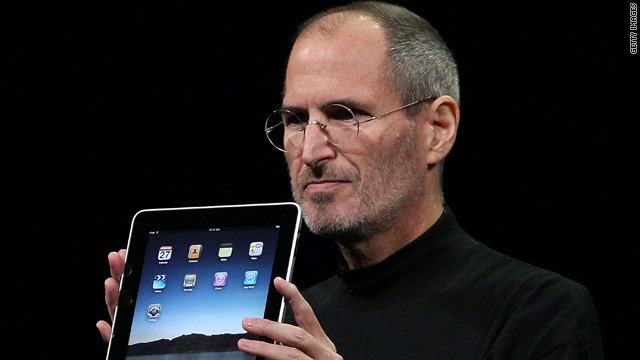
The rumors are over. Apple REALLY is releasing an electronic tablet in a couple of months! And because this new class of device has HUGE implications for readers everywhere, I thought I'd write a few words about it.

In terms of people's reaction, suffice it to say that many have been wowed, while many others have been left less than impressed.

I'm somewhere in the middle.

On the negative side, I'm disappointed that the iPad is basically a giant iPod Touch. It doesn't come equipped with a high-powered processor nor does it sport Apple's powerful Snow Leopard operating system. It has no camera, no USB port (or any port other than a standard iPod/iPhone connection). And with the bigger screen, the absence of Adobe Flash support will be very awkward indeed!

On the positive side though, the device is a breakthrough and will probably lay waist to the Amazon Kindle and Sony eBook Readers, among others. Those devices are not illuminated and certainly cannot display color graphics or videos. The iPad will now allow you to carry your books, pictures, music and videos while letting you connect to the Internet through a WI-FI connection or a WI-FI + 3G connection through AT&T (for a $30 monthly fee). And all this in an elegantly refined form factor and a light 1.5 lbs!

I think that the iPad's $499 price point will be compelling to enough people to make it a big a success. I can see myself on weekend mornings reading the New York Times with a cup of hot coffee. That's much more comfortable and intimate than sitting in front of a PC or laptop. I can see myself purchasing e-books and having access to them from anywhere. That's a big plus!
I can also see myself running some of my favorite apps such as Mint, Evernote and making calls through Skype!

But as good as that sounds, that's not enough for me to part with up to $899 for a device with very limited computing horsepower.

So before I run out to the nearest Apple Store I need one more thing: I need a stylus and handwriting recognition software.

Apple already owns the technology. It's called Inkwell and it's available in Mac OS X.

I want to be able to walk into business meetings, or be able to create my mind maps, without having to type on glass. I want all my notes to be immediately indexed and made searchable, not unlike what I'm able to do with Evernote.

Basically, I'd like to part ways with paper and instead rely on the "cloud." Goodbuy paperbacks, goodbuy cumbersome notebooks...hello iPad. Make that happen Apple, I'm ready to buy!